
How to Use Background Sounds to Improve Focus on iPhone
Q: How can I reduce distractions and improve focus using my iPhone?
A: If you struggle with noise distractions or need a calming sound environment, Background Sounds on iPhone can help. This built-in feature plays ambient sounds like rain, ocean waves, or white noise, helping you focus, relax, or fall asleep.
How to Enable Background Sounds on iPhone
-
Open Settings.
-
Go to Accessibility > Audio/Visual.
-
Tap Background Sounds.
-
Toggle Background Sounds on.
-
Choose from different sound options:
-
Balanced Noise
-
Bright Noise
-
Dark Noise
-
Ocean
-
Rain
-
Stream
-
-
Adjust the volume level and choose whether the sound should continue while media is playing.
Best Ways to Use Background Sounds
-
Boost Focus – Use white noise while studying or working.
-
Relax & Sleep – Fall asleep faster with calming ocean or rain sounds.
-
Reduce Anxiety – Play ambient noise to stay calm in stressful situations.
-
Block Out Distractions – Use it in noisy environments like coffee shops or public transport.
Quick Access to Background Sounds
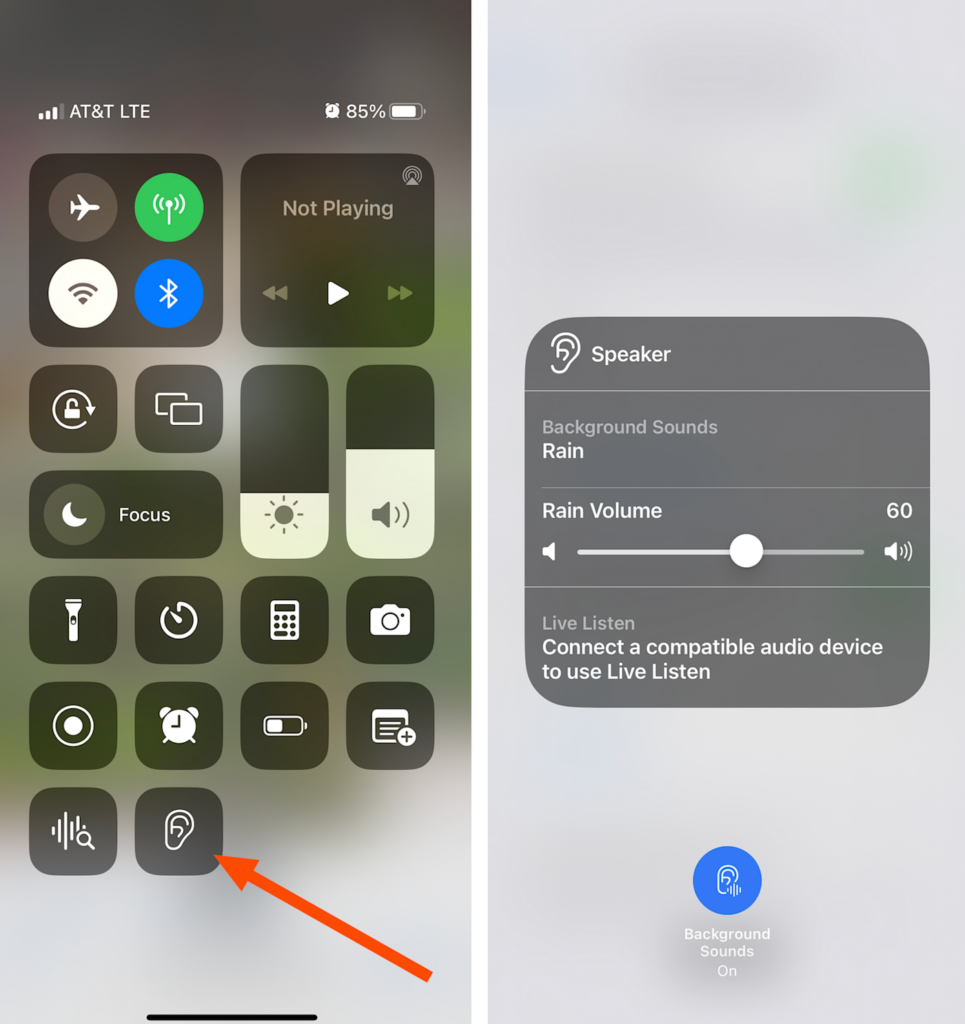
-
Open Control Center, tap the Hearing (👂) icon, and select Background Sounds for faster access.
-
Works offline, so no internet is required!